由于 ONTAP 和 DC 之间的时间差异,无法使用主机名访问 CIFS 共享
适用于
- ONTAP 9
- CIFS/SMB
- Kerberos
- Linux 客户端
- Windows 客户端
问题
- 无法使用主机名或 FQDN 访问 CIFS 共享
- CIFS 共享频繁断开,卷无法访问
- 在 Linux 系统上,命令(例如
df)可能会失败,Input/output Error - 无法将 SMB(通过带有 Samba 的 UNIX/Linux 客户端)共享与主机名映射
示例:
\\server1 is not accessible. You might not have permission to use this network resource.
 Contact the administrator of this server to find out if you have access permissions.
- Windows 错误:
Windows can't access this disc. The disc might be corrupt. Make sure that the disc uses a format that Windows recognizes. If the disc is unformatted, you need to format it before using it. - EMS 日志引发以下
secd: secd.lsa.noServers:EMERGENCY错误:
Thu Oct 30 02:24:34 +0900 [cluster-1-01: secd: secd.lsa.noServers:EMERGENCY]: None of the LSA servers configured for Vserver (svm_1) are currently accessible via the network.
- 在 SVM 设置/域选项卡中发现的域控制器列表为空
- AutoSupport (ASUP) 部分 NTPDC-PEER 指示时钟偏差:
示例:
remote local st poll reach delay offset disp========================================================================169.254.220.102 169.254.128.127 13 64 377 0.00005 +0.000305 0.03099=10.1.1.100 10.1.1.36 2 64 377 0.00038 -309.2772 0.03073
- 默认情况下,ONTAP 尝试使用 Kerberos 进行身份验证。
SECD 和/或 EMS 日志:
示例:
Mon Jan 01 18:00:30 -0700 [CLUSTER-XX: secd: secd.cifsAuth.problem:error]: vserver (SVM1) General CIFS authentication problem.
 Error: User authentication procedure failed CIFS SMB2 Share mapping - Client Ip = 10.11.XX.XX
[  0 ms] Login attempt by domain user 'Domain\user' using NTLMv2 style security
 [    0] Successfully connected to ip 10.1.XX.XX, port 445 using TCP
 [    3] Encountered NT error (NT_STATUS_MORE_PROCESSING_REQUIRED) for SMB command SessionSetup
 [    3] Cluster, Domain Controller or Client time differs by more than the configured clock skew with respect to the others (KRB5KRB_AP_ERR_SKEW)
 [    3] Kerberos authentication failed with result: 7537.
 [    4] Unable to connect to NetLogon service on dc01.domain.com (Error: RESULT_ERROR_SECD_NO_CONNECTIONS_AVAILABLE)
 [    4] Successfully connected to ip 10.1.XX.XX, port 445 using TCP
 [    7] Encountered NT error (NT_STATUS_MORE_PROCESSING_REQUIRED) for SMB command SessionSetup
 [    7] Cluster, Domain Controller or Client time differs by more than the configured clock skew with respect to the others (KRB5KRB_AP_ERR_SKEW)
 [    7] Kerberos authentication failed with result: 7537.
 [    7] Unable to connect to NetLogon service on dc02.domain.com (Error: RESULT_ERROR_SECD_NO_CONNECTIONS_AVAILABLE)
 [    7] No servers available for MS_NETLOGON, vserver: 3, domain: domain.com.
 [    7] FAILURE: Unable to make a connection (NetLogon:DOMAIN.COM), Result: RESULT_ERROR_SECD_NO_SERVER_AVAILABLE
 [    8] CIFS authentication failed
- Windows 无法访问此磁盘:
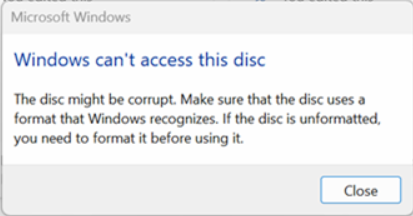
注意: Windows 无法访问此光盘。光盘可能已损坏。确保光盘使用 Windows 可识别的格式。如果光盘未格式化,则需要在使用前对其进行格式化。