跳转到主内容

适用于 VMware vSphere 的 ONTAP Tools:如何无中断地从 OTV 中删除集群

Views:
47
Visibility:
Public
Votes:
0
Category:
virtual-storage-console-for-vmware-vsphere
Specialty:
virt
Last Updated:

适用于

ONTAP Tools for VMware vSphere (OTV) 9.x

说明

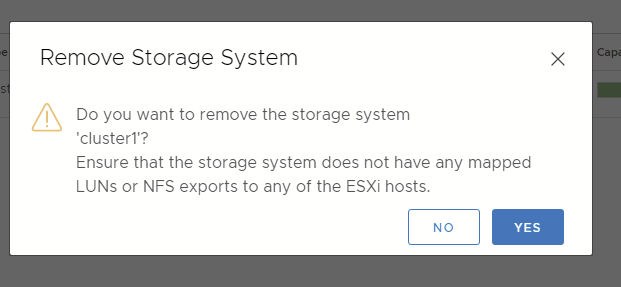
尝试从 OTV 中删除存储系统时,可以看到:
 clipboard_ec1d86320bba524ed0f0ff4e02b59d88d.png

使用 OTV 将数据存储区装载到 ESXi 主机时,此行为是预期的。

此提示是 OTV 使用的安全机制之一,用于防止用户在 VMware 中存在已挂载数据存储时意外删除存储。

Sign in to view the entire content of this KB article.

New to NetApp?

Learn more about our award-winning Support

NetApp provides no representations or warranties regarding the accuracy or reliability or serviceability of any information or recommendations provided in this publication or with respect to any results that may be obtained by the use of the information or observance of any recommendations provided herein. The information in this document is distributed AS IS and the use of this information or the implementation of any recommendations or techniques herein is a customer's responsibility and depends on the customer's ability to evaluate and integrate them into the customer's operational environment. This document and the information contained herein may be used solely in connection with the NetApp products discussed in this document.