跳转到主内容

如何在 Active IQ Unified Manager 中配置和接收来自 ONTAP EMS 事件订阅的警报

Views:
500
Visibility:
Public
Votes:
0
Category:
active-iq-unified-manager
Specialty:
om
Last Updated:

适用于

  • ONTAP 9.3.x 及更高版本
  • ONTAP EMS
  • OnCommand Unified Manager 7.x - 9.5.x
  • Active IQ Unified Manager 9.6.x 及以上

说明

  • OnCommand Unified Manager 已更名为 Active IQ Unified Manager,自 9.6 版本起。 
    • 在本文中,Unified Manager 将同时指 OnCommand Unified Manager 和 Active IQ Unified Manager。
  • Unified Manager 作为一个集中位置,用于接收关键的 EMS 事件,并通过针对 EMS 事件配置的警报向管理员发送通知。

操作步骤

在 Unified Manager 中配置 EMS 订阅

本节描述如何在 Unified Manager 中实施 EMS 订阅并验证配置。

重要提示:为了使 Unified Manager 在收到感兴趣的 EMS 事件时发送通知,必须配置警报。

在 Unified Manager 中配置 EMS 订阅

  1. 登录到 Unified Manager Web UI。
  2. 根据 Unified Manager 版本,导航到:   
    • Active IQ Unified Manager 9.6.x + 
      • 点击  存储管理 > 事件设置 >  
    • OnCommand Unified Manager 7.x - 9.5.x
      • 单击  配置 > 管理事件 > 
  3. 单击 订阅 EMS 事件(右上角)。
    • 在 Subscribe to EMS events 对话框中,输入要订阅的 ONTAP EMS 事件的名称。EMS 事件必须作为单个事件输入。多个事件(无论分隔符如何)或"通配符"事件(例如:snapmirror.status*)不能在"EMS 事件名称"字段中使用,否则订阅过程将失败。  请勿输入任何已标记为已弃用的事件名称。
    • 注意: 该Description字段不是订阅流程的必填字段。可选说明仅有助于识别此列表中的 EMS 事件,其他任何地方都看不到。
    • 使用上面的 SnapMirror 状态示例,消息名称为:snapmirror.status.updateStatusErr

      User-added image
  4. 单击添加。
    • EMS 事件已添加至已订阅 EMS 事件列表,但在适用于集群列中显示"Unknown"状态。

      User-added image
  5. 继续,单击"添加",并在需要时将单个 EMS 事件名称添加到"订阅的 EMS 事件"列表中。  
  6. 单击 保存并关闭 以启动 EMS 事件订阅过程。此订阅过程针对 Unified Manager 当前监视的每个群集执行。屏幕上将显示一条横幅消息,指示订阅过程已启动。

在 Unified Manager 中验证 EMS 订阅

  •     点击订阅 EMS 事件。
    • "是"出现在已添加 EMS 事件的"适用于集群"列中。如果状态不是"是",请检查 ONTAP EMS 事件的拼写。如果输入的名称不正确或存在DNS 问题,则必须删除不正确的事件或更正 DNS 配置,然后再次添加事件。
  • 注: Unified Manager 中的 EMS 订阅过程将针对 Unified Manager 当前正在监视的每个集群触发。

User-added image

验证集群上的 EMS 订阅:
即使状态"是"出现在添加的 EMS 事件的"适用于集群"列中,EMS 订阅过程可能尚未在 Unified Manager 监控的所有集群上成功配置。必须首先验证不正确的事件名称(印刷错误),并通过删除事件名称并添加正确的拼写来更正。

注:

  • 如果EMS事件名称在ONTAP版本中不可用,则订阅无法成功。
  • ONTAP 9.11.x及更高版本需要进入::>priv set diag才能使用这些命令。

验证目标( Unified Manager )是否已作为 Syslog Dest 添加到集群:

    ONTAP 9.3+:在 Unified Manager 订阅过程成功完成后,AIQUM 将自动添加为事件目标:

    • Active IQ Unified Manager <9.18 或 9.18+(已禁用 Cloud Agent)。
      cluster::*> event destination show
                                            Hide
      Name        Mail Dest.     SNMP Dest.      Syslog Dest.     Params

      ---------------- ----------------- ------------------ ------------------ ------
      allevents     -          -          -          false
      asup        -          -          -          false

      criticals     -          -          -          false
      um.lab.demo    -          -          um.lab.demo     false

      pager       -          -          -          false
      traphost      -          -          -          false

      6 entries were displayed.
    • Active IQ Unified Manager 9.18+(已启用 Cloud Agent)。
      cluster::> event notification destination show
      Name       Type     Destination
      --------------  ----------  ---------------------

    <UM hostname or ip>_server
             rest-api   https://<UM_hostname or ip>:9443/acq/ontap/ems

    <UM hostname or ip>_serverSysLog
             syslog    <UM_hostname or ip> (port: 514, transport: udp-unencrypted)

    验证已将请求的事件配置为由集群发送到 Syslog Dest(Unified Manager)

    如果在Unified Manager中配置了多个事件,请验证以下命令的输出中是否存在每个感兴趣的事件。

    ONTAP 9.3+:

    • Active IQ Unified Manager <9.18 或 9.18+(已禁用 Cloud Agent)。
      cluster::*> event route show -destinations um.lab.demo -fields message-name
      message-name            severity
      --------------------------------- --------
      snapmirror.status.updateStatusErr ERROR 
    • Active IQ Unified Manager 9.18+(已启用 Cloud Agent)
      cluster::> event filter show <UM_hostname or ip>_filterSyslog

      Filter    Rule Rule                   SNMP Trap
      Name     Posn Type    Message Name    Severity    Type    Parameters
      ----------- ---- -------- ---------------- ------------- --------- -----------
      <UM_hostname or ip>_filterSysLog
             2   include  wafl.snap.create.skip.reason
                            EMERGENCY, ALERT, ERROR, NOTICE, INFORMATIONAL, DEBUG
                                   Standard, Built-in, Severity-based
                                        *=*
             3   include  wafl.vol.outOfInodes
                            EMERGENCY, ALERT, ERROR, NOTICE, INFORMATIONAL, DEBUG
                                   Standard, Built-in, Severity-based
                                        *=*
             4   include  wafl.dir.size.max.warning
                            EMERGENCY, ALERT, ERROR, NOTICE, INFORMATIONAL, DEBUG
                                   Standard, Built-in, Severity-based
                                        *=*
             5   include  vol.language.changed
                            EMERGENCY, ALERT, ERROR, NOTICE, INFORMATIONAL, DEBUG
                                   Standard, Built-in, Severity-based
                                        *=*
             6   include  callhome.clus.net.degraded
                            EMERGENCY, ALERT, ERROR, NOTICE, INFORMATIONAL, DEBUG
                                   Standard, Built-in, Severity-based
                                        *=*
             7   include  wafl.vvol.offline
                            EMERGENCY, ALERT, ERROR, NOTICE, INFORMATIONAL, DEBUG
                                   Standard, Built-in, Severity-based
                                        *=*
             8   exclude  *         *        *      *=*

      警报

    Active IQ Unified Manager还可以发送通知,提醒您在您的环境中触发 EMS 事件。

    1. 导航到Alert Setup页面,然后单击Add 以添加新警报。  如果需要,请提供新的警报名称和警报描述,然后单击Resources

    注意:EMS 事件通知的现有警报也可以通过类似的方式进行修改。

    clipboard_edfd249ca88164f688fbdd7c621e0ef32.png

    1. 包含或排除要包含在此警报中的资源,然后继续 Events

    clipboard_ec94c5f002cbd678ea808d8c424cc1b53.png


    3.根据事件的严重程度选择 EMS 事件,如下所示。然后前往Actions 选项卡。

    clipboard_e2ce38eb871fbfcb4af302d42042b2c69.png

    4.  提供有关如何向用户发出有关相应 EMS 事件的警报的信息,以及警报的通知频率。  如果需要,用户还可以在触发警报时执行自定义脚本。完成后单击 Save 。 

    clipboard_e423bb4a3ccecbec1d3e9af629650fcb3.png

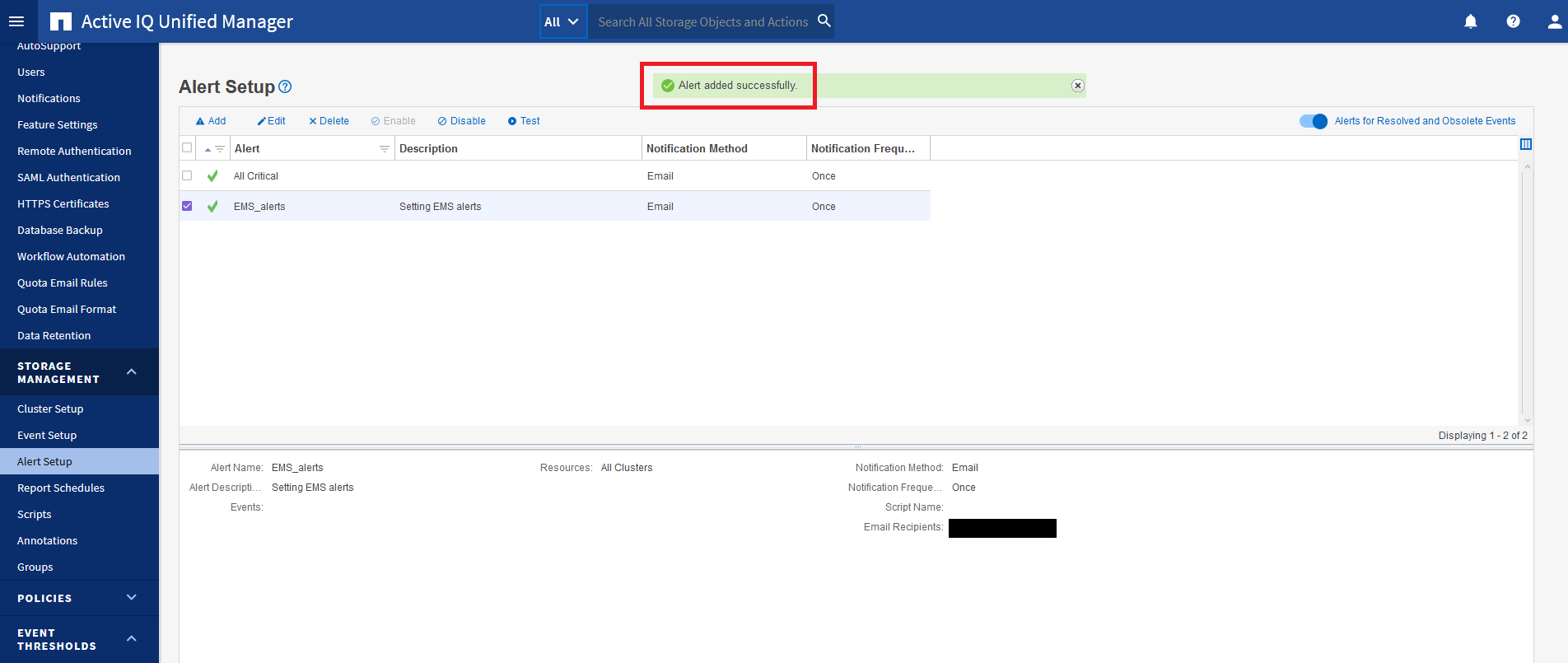
    5.应将确认显示在绿色横幅中,表示已成功添加警报。

    clipboard_ebe9d4e7d181818acc9db6c53ddbacaaa.png


    NetApp provides no representations or warranties regarding the accuracy or reliability or serviceability of any information or recommendations provided in this publication or with respect to any results that may be obtained by the use of the information or observance of any recommendations provided herein. The information in this document is distributed AS IS and the use of this information or the implementation of any recommendations or techniques herein is a customer's responsibility and depends on the customer's ability to evaluate and integrate them into the customer's operational environment. This document and the information contained herein may be used solely in connection with the NetApp products discussed in this document.